Settlement Files
This section describes all the settlement files provided. Each file is documented with descriptions and worked examples of key sections.
All reports show amounts with the correct decimal places for that currency. i.e JPY will appear as 100, and EUR will appear a 1.00
Settlement Summary PDF
The Settlement Summary PDF shows the settlement activity for the current settlement period in the currencies they are to be settled in.
A full example and explanation about each section are provided below.
- Payment Summary - Page 1
- Activity Breakdown - Page 2
- Adjustment - Page 3
- Rolling Reserves - Page 4
Filename Format
<Merchant Name>Settlement_Summary<Date>-<Version>.pdf
- Merchant Name - The name of merchant
- Date - The settlement date of the report (format ddMMyyyy)
- Version - The version of the report (2 digit zero padded number starting 01)
Payment Summary
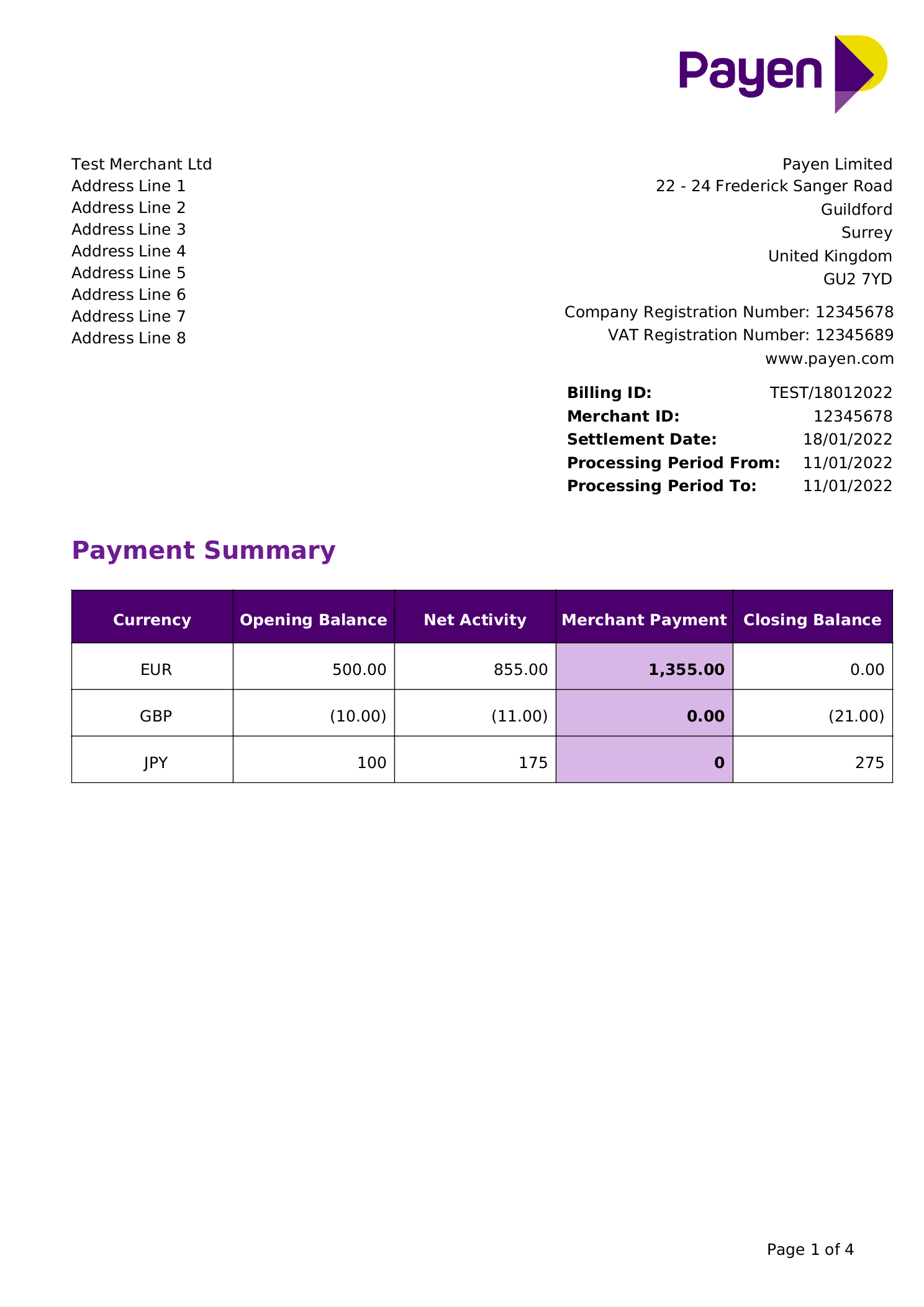
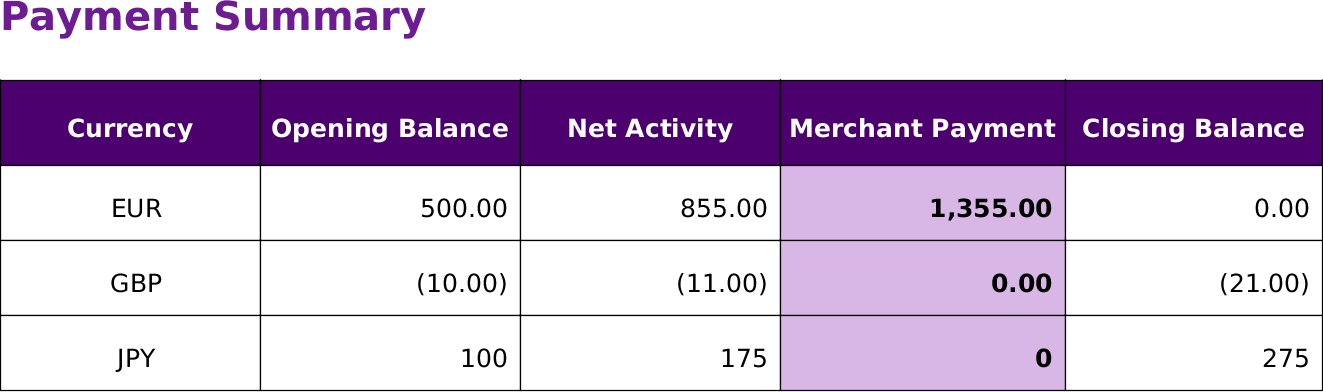
The Payment Summary section shows the balances per currency for the current settlement period.
Payments will only be made automatically when the balance in that currency is greater then 1000. In the example above, the EUR amount owed is 1,355.00 which exceeds the threshold and is paid. The JPY value of 175 is below the threshold, so no payment is made and a closing balance is updated accordingly.
Payment Activity
Currency is the currency for all the figures on the row.
Opening balance is the outstanding balance from the previous settlement period.
Net Activity is the total activity during the current settlement period and any adjustments.
Merchant Payment is the amount to be settled to the merchant.
Closing Balance is the outstanding balance at the end of the settlement period.
Activity Breakdown
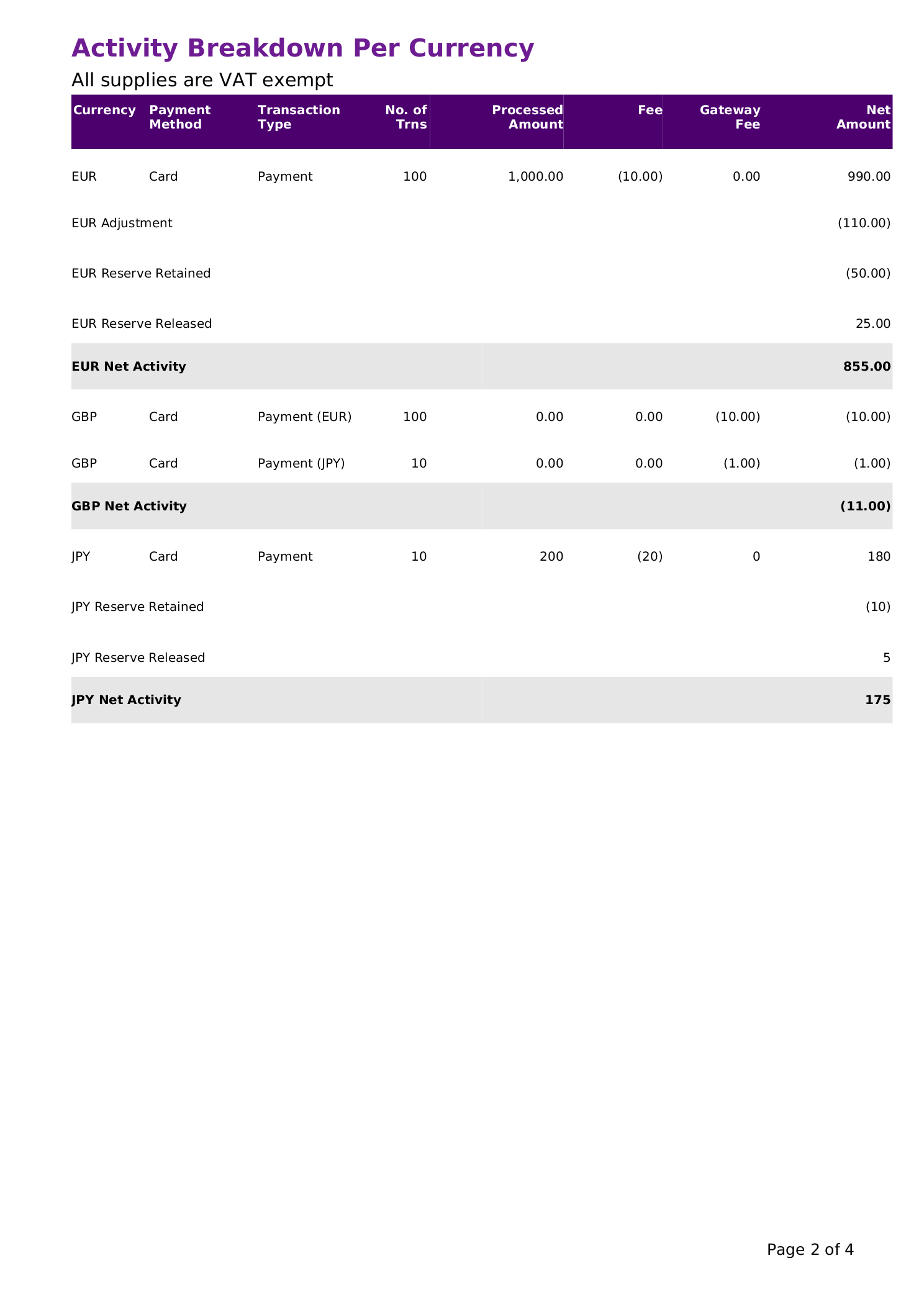
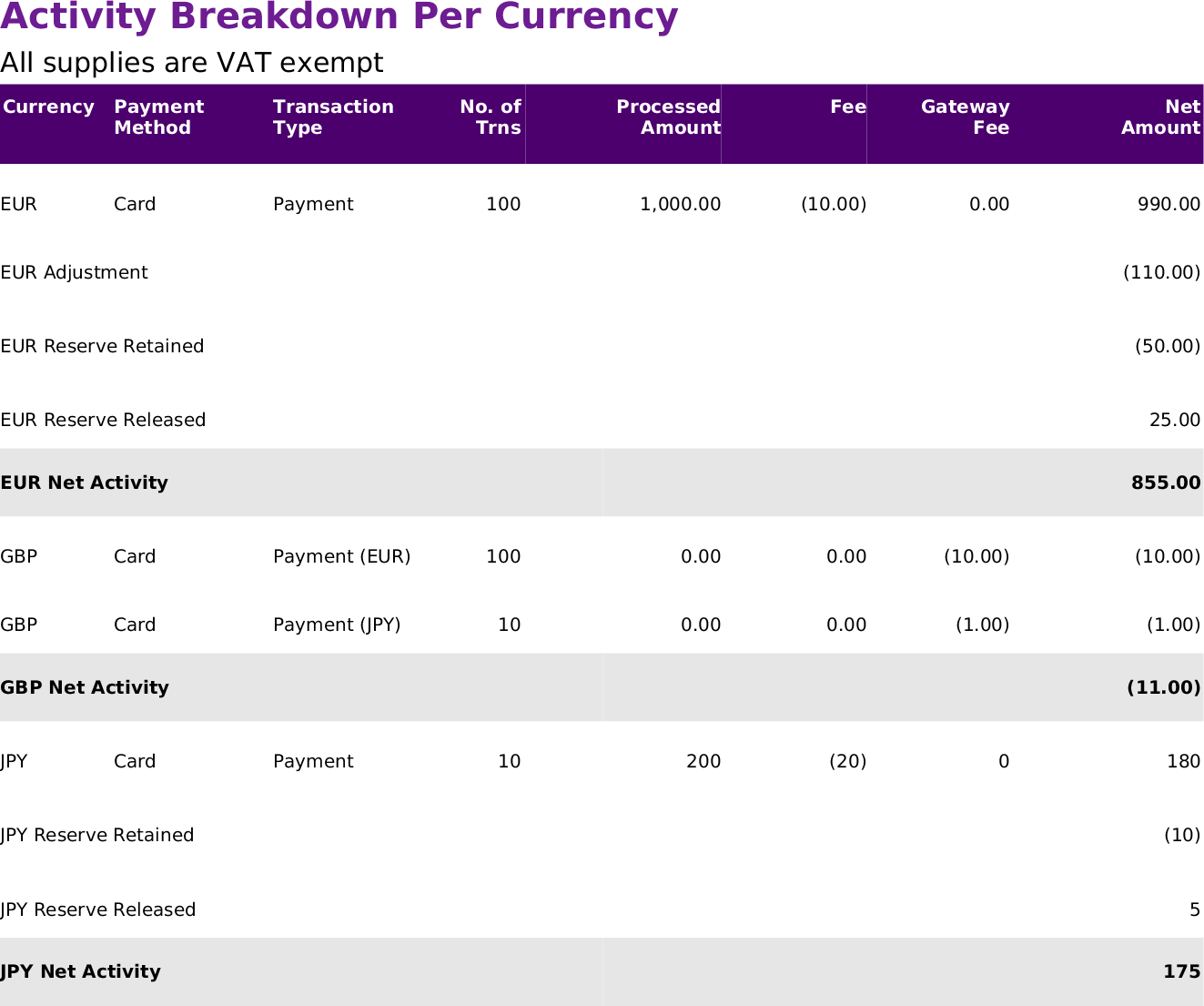
The Activity Breakdown section shows the activity for the current settlement period, broken down by Currency, Payment Type and Transaction Type. Each row details the number of transactions, processed amount and the fees applied.
Where adjustments are made, the net amount of all adjustments will appear as a sub total. The details of the adjustments made are detailed below in the Adjustments section.
Where reserves are retained or released, the amounts will appear as a sub total. Details of the full reserves positions are detailed in the Rolling Reserves section.
Activity Breakdown
Currency is the currency for all the figures on the row.
Payment Method is a type of payment, i.e. CARD, IDEAL, SOFORT.
Transaction Type is lifecycle event within a Payment Method, i.e. PAYMENT, REFUND.
No. of Trns is the number of transactions processed for the current Payment Method and Transation Type.
Processed Amount is the value of transactions processed for the current PM and TT row.
Fee is the fee charged per transaction, based on transaction type, value according to the contractual terms.
Gateway Fee is the fee charged for using the |brand| gateway, according to the contractual terms.
Net Amount is the Processed Amount net of fees.
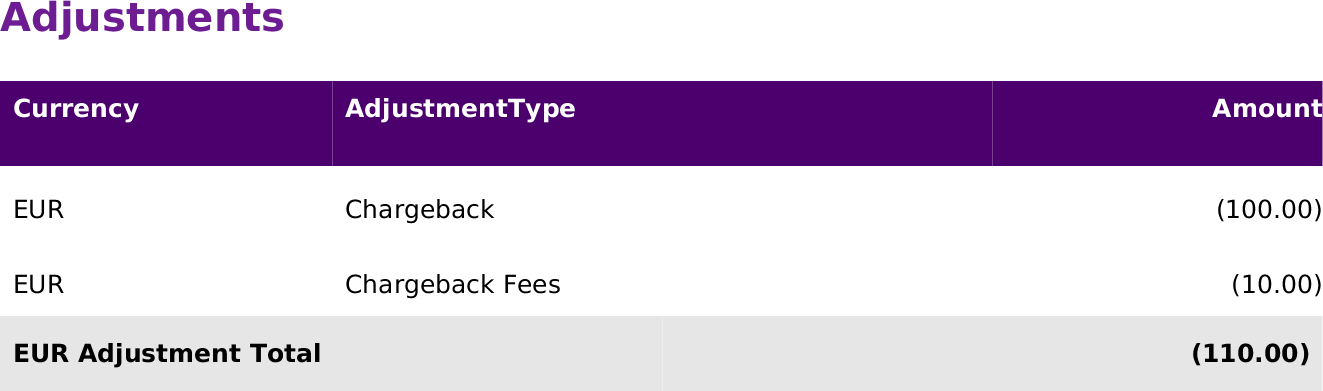
Adjustment is the value of the adjustments, detailed in the Adjustments section.
Rolling Reserve Retained, is the reserve amount being reserved from this settlement period.
Rolling Reserve Released, is the reserve amount being released from previous settlement periods, that is now due.
Adjustments
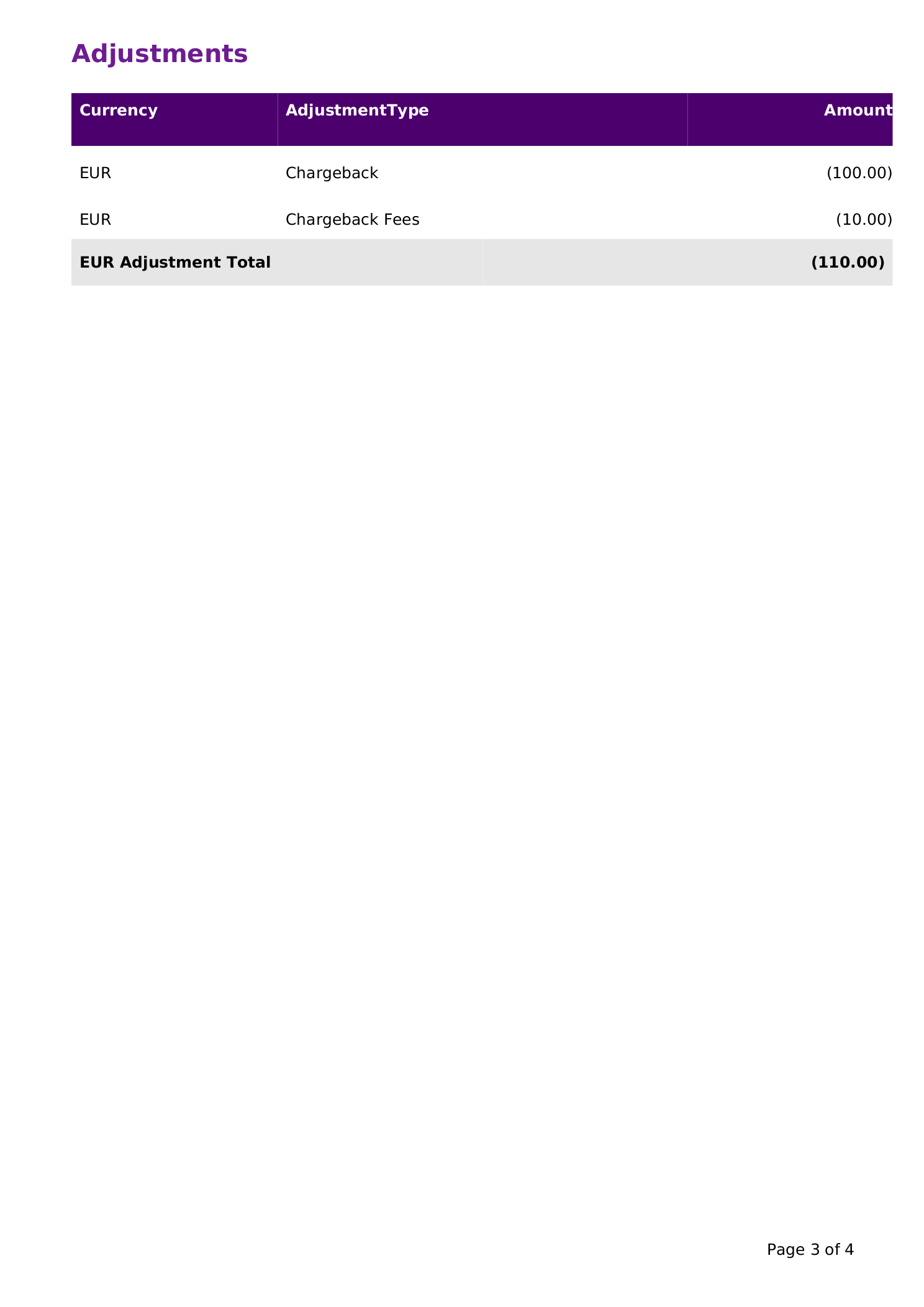
The Adjustments section shows the adjustments made in addition to the processing activity, such as Chargebacks and Balance Adjustments.
Adjustments
Rolling Reserves
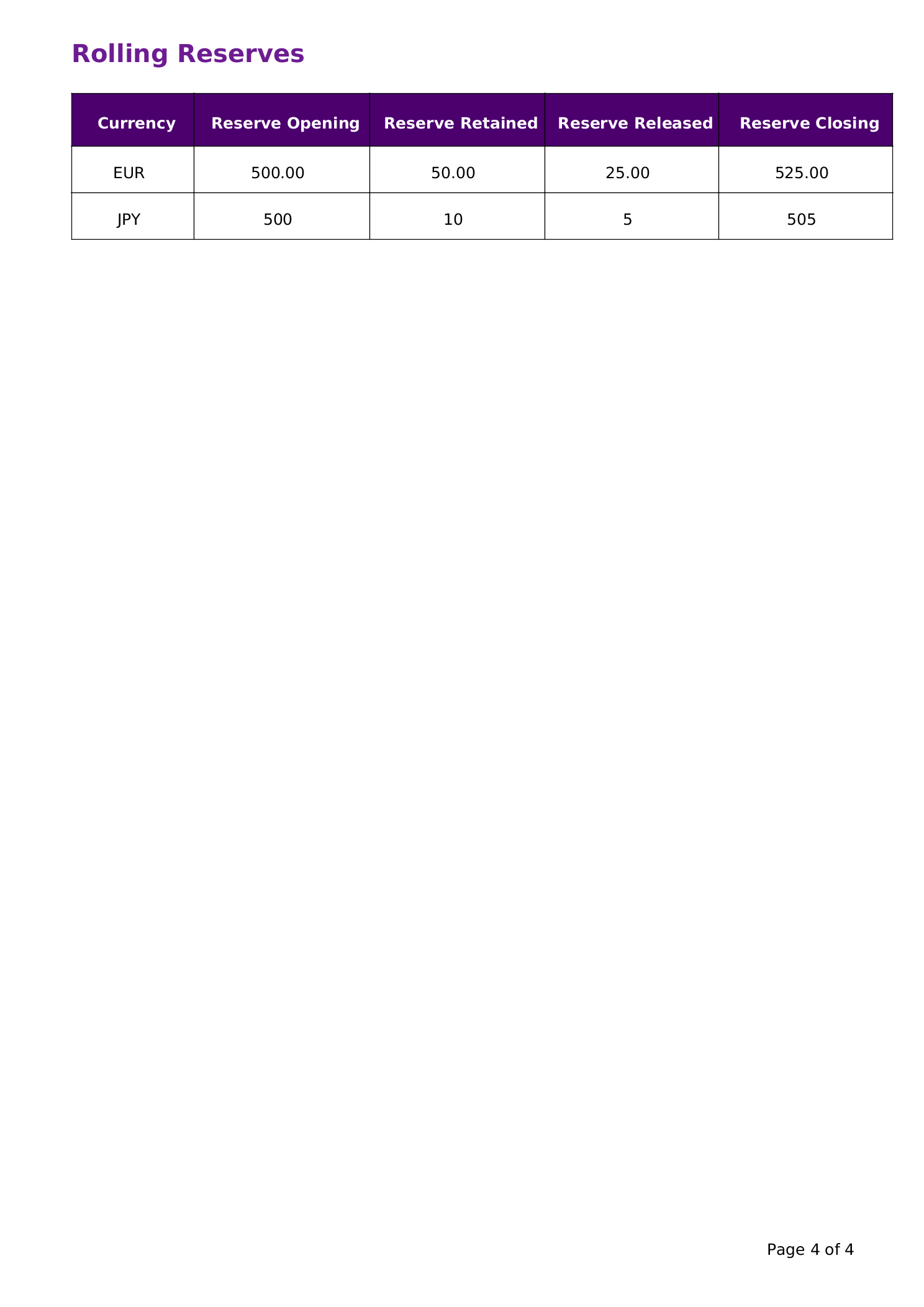
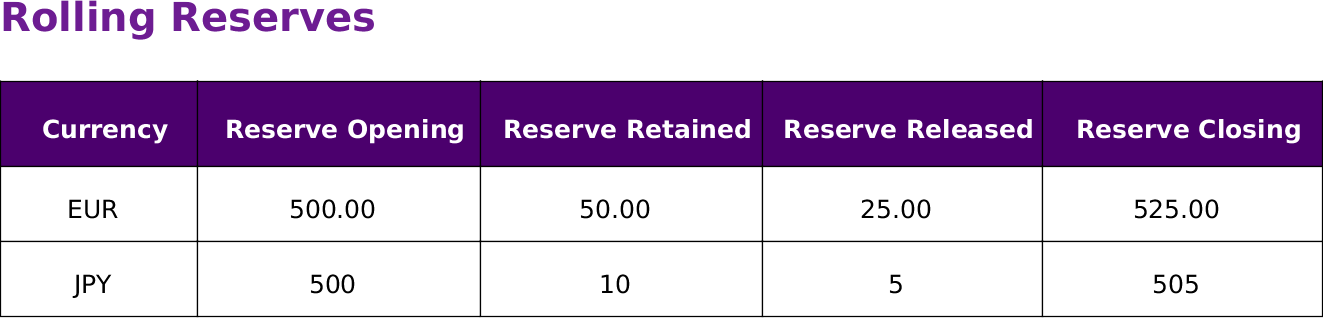
The Rolling Reserves section shows the reserves held per currency. This table shows the rolling reserve up to and including the current settlement period.
Rolling Reserves
Currency is the currency for all the figures on the row.
Reserve Opening is the reserve balance at the beginning of the current settlement period.
Reserve Retained is the total amount of reserve being retained during the current settlement period.
Reserve Released is the total amount of reserve being released during the current settlement period.
Reserve Closing is the reserve balance at the end of the current settlement period.
Settlement Summary CSV
Description
The Settlement Summary CSV details the individual transactions processed in the settlement period.
Filename Format
<Merchant Name>Settlement_Summary<Date>-<Version>.csv
- Merchant Name - The name of merchant
- Date - The settlement date of the report (format ddMMyyyy)
- Version - The version of the report (zero padded number starting 01)
Column Descriptions
The format of the detail csv file has been maintained for backward compatibility, however not all of the columns are currently in use and may be removed in future versions. Any columns that are not used are noted in the table below.
| Column Name | Description | Format | Notes |
|---|---|---|---|
| Statement Date | The date the statement is generated | Date (dd/MM/yyyy) | |
| Settlement Date | The date the transaction will be settled | Date (dd/MM/yyyy) | |
| Transaction Timestamp | The timestamp of the operation in the payment system | Timestamp (dd/MM/yyyy HH:mm:SS) | |
| Merchant ID | The numeric merchant ID | Integer | |
| Account Name | The name of the account | String | |
| Transaction ID | The transaction ID returned in the original payment request | Integer | |
| Merchant Transaction Ref | The transaction reference provided by the merchant in the original request | String | |
| Customer Ref | The customer reference provided by the merchant in the original request | String | |
| Transaction Type | The type of transaction | String | |
| Payment Method | The payment method used | String | |
| Card Brand | The brand of the card (if applicable) | [VISA, MASTERCARD] | |
| Card Type | The type of the card (if applicable) | [CREDIT, DEBIT] | |
| Card Type 2 | The classification of the card (if applicable) | [PERS, CORP] | |
| Card Country | The country the card is issued (if applicable) | ISO 3166-1 alpha-2code | |
| Processing Currency | The original currency of the transaction | ISO 4217 alphabetic code | |
| Transaction Amount | The amount of the tranaction in the Processing Currency | decimal | |
| Processing Fee Model | The type of fee charged | [PERCENT, FLAT] | |
| Processing Fee Rate | The rate charged | decimal | |
| Processing Fee Currency | The currency of the fee | ISO 4217 alphabetic code | |
| Processing Fee Amount | The major amount of the fee | decimal | |
| Pinpay Fee Model | The type of fee charged | [PERCENT, FLAT] | Superceded by PSP Fee Model |
| Pinpay Fee Rate | The rate charged | decimal | Superceded by PSP Fee Rate |
| Pinpay Fee Currency | The currency of the fee | ISO 4217 alphabetic code | Superceded by PSP Fee Currency |
| Pinpay Fee Amount | The major amount of the fee | decimal | Superceded by PSP Fee Amount |
| PSP Fee Model | The type of fee charged | [PERCENT, FLAT] | |
| PSP Fee Rate | The rate charged | decimal | |
| PSP Fee Currency | The currency of the fee | ISO 4217 alphabetic code | |
| PSP Fee Amount | The major amount of the fee | decimal | |
| Refund Fee Model | The type of fee charged | [PERCENT, FLAT] | |
| Refund Fee Rate | The rate charged | decimal | |
| Refund Fee Currency | The currency of the fee | ISO 4217 alphabetic code | |
| Refund Fee Amount | The major amount of the fee | decimal | |
| Credit Fee Model | The type of fee charged | [PERCENT, FLAT] | |
| Credit Fee Rate | The rate charged | decimal | |
| Credit Fee Currency | The currency of the fee | ISO 4217 alphabetic code | |
| Credit Fee Amount | The major amount of the fee | decimal | |
| Payout Fee Model | The type of fee charged | [PERCENT, FLAT] | |
| Payout Fee Rate | The rate charged | decimal | |
| Payout Fee Currency | The currency of the fee | ISO 4217 alphabetic code | |
| Payout Fee Amount | The major amount of the fee | decimal | |
| Reversal Fee Model | The type of fee charged | [PERCENT, FLAT] | |
| Reversal Fee Rate | The rate charged | decimal | |
| Reversal Fee Currency | The currency of the fee | ISO 4217 alphabetic code | |
| Reversal Fee Amount | The major amount of the fee | decimal | |
| Settlement Currency | The currency that will be settled | ISO 4217 alphabetic code | |
| Settlement Amount Gross | The gross amount that will be settled in the Settlement Currency | decimal | |
| Settlement Amount Net | The net amount that will be settled minus fees and reserve in the Settlement Currency | decimal | |
| Rolling Reserve Rate | The percentage of the Transaction Amount that will be reserved in the Settlement Currency | decimal | |
| Rolling Reserve Amount | The amount that will be reserved in the Settlement Currency | decimal | |
| Rolling Reserve Release Date | The date the reserve will be released | Date (yyyy-MM-dd) | |
| Operation Ref | The operation reference returned in the original payment request | String |
Payment Summary CSV
Description
The Payment Summary CSV is a copy of the data in the Payment Summary section from the Settlement Summary PDF in csv format.
Filename Format
<Merchant Name>Payment_Summary<Date>-<Version>.csv
- Merchant Name - The name of merchant
- Date - The settlement date of the report (format ddMMyyyy)
- Version - The version of the report (zero padded number starting 01)
Column Descriptions
| Column Name | Description | Format |
|---|---|---|
| Merchant ID | The merchant reference | String |
| Statement Date | The date the statement is generated | Date (dd/MM/yyyy) |
| Settlement Date | The date the transaction will be settled | Date (dd/MM/yyyy) |
| Processing From Date | The opening date of the current settlement period | Date (dd/MM/yyyy) |
| Processing To Date | The closing date of the current settlement period | Date (dd/MM/yyyy) |
| Currency | The currency for all the figures on the row. | ISO 4217 alphabetic code |
| Opening Balance | The outstanding balance from the previous settlement period. | decimal |
| Net Activity | The total activity during the current settlement period and any adjustments. | decimal |
| Merchant Payment | The amount to be settled to the merchant. | decimal |
| Closing Balance | The outstanding balance at the end of the settlement period. | decimal |