
Message Flow

The message flow will depend on the type of IPFrame2 configuration in use for the merchant and account. The standard IPFrame2 configuration will present the user with a choice of payment methods and guide them through the process. However, there is also a simplified flow available through the Simplified IP.Frame (SIP). In this case, the merchant account will be configured to allow only one payment method, and the user will be taken to directly to the appropriate page for that method, eliminating the need to select the payment method. On completion of the transaction the browser is returned to the merchant site without the need for the user to close an IPFrame2 confirmation page.

Standard IPFrame2 Message Flow

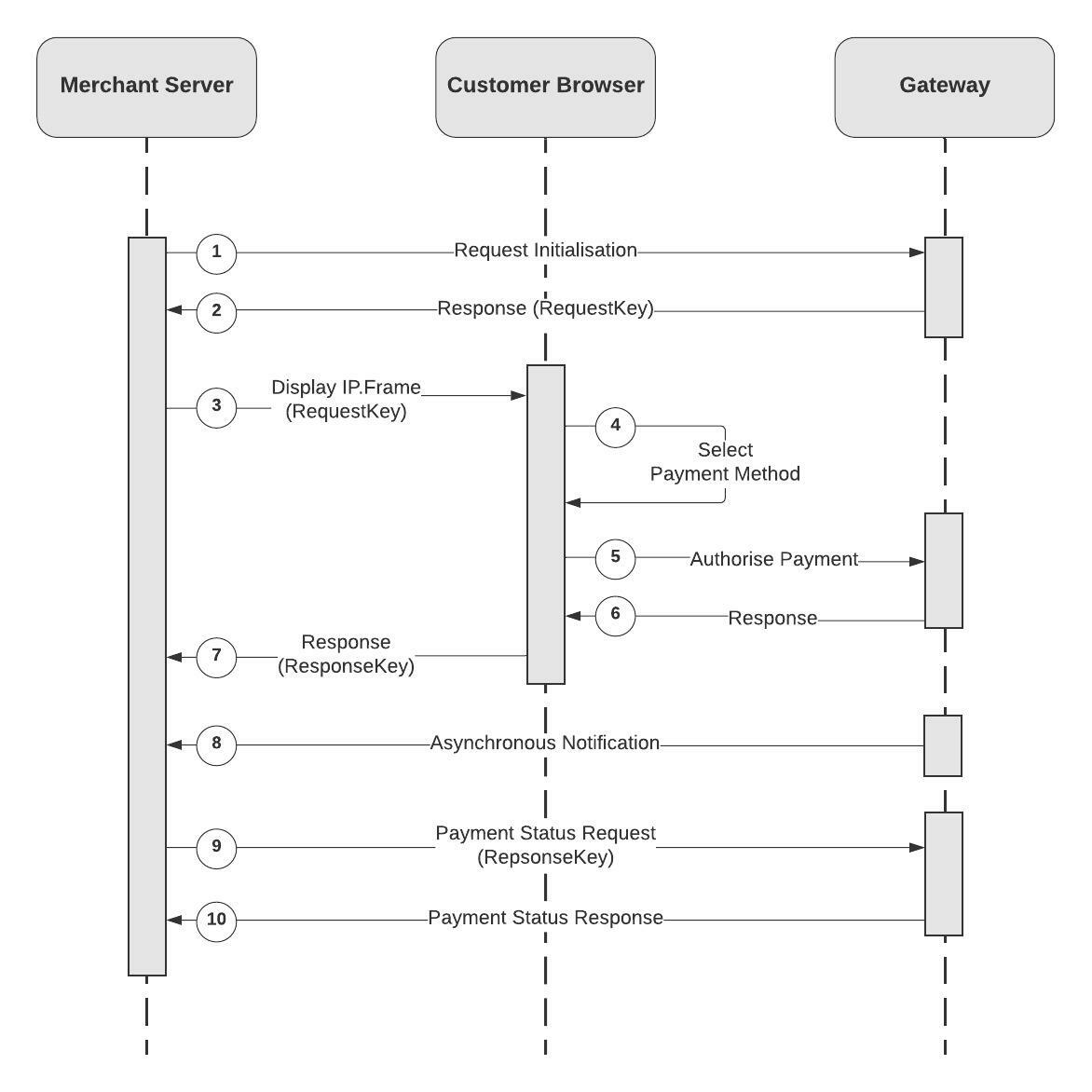
The following diagram shows the message flow and interactions involved in an Payen Platform transaction and the responsibilities of each party involved.
image

  1. The merchant gathers information about the client and the purchase and constructs the request to send directly to the Payen Platform to initiate the transaction.This is a server to server request to eliminate the possibility of message tampering or exposing sensitive information via the customer’s browser.
  2. A request is received by the Payen Platform. The request is validated and a request key is generated for this transaction. The request key is a merchant unique, secure, indeterminable value that will be used to identify the transaction in the next step.
  3. Through an iframe embedded in the merchant’s web site, the source of the iframe is set to a URL consisting of the IP.FrameURLand, among other values, the request key from the previous step. The Payen Platform receives the parameters, validates the request and displays the IP.Frame to the customer.
  4. The IP.Frame takes control, adding new payment methods or amending existing ones. The client will choose a payment method to complete the transaction
  5. The customer’s payment method is authorised using the details provided in step 1.
  6. The IP.Frame will control user experience based on the response of the authorisation. If the transaction was declined more options will be presented to the customer in an effort to authorise the payment using correct details or other payment methods.
  7. A POST message containing the response key is sent back to the merchant via the customer’s browser. The merchant is now back in control of the customer and can complete the order process or display feedback to the customer.
  8. If configured to do so, the Payen Platform can send an asynchronous notification to the merchant, server to server, containing the result of the entire process so that the relevant completion message can be displayed to the customer. This is a message containing all the details of the transaction in the same format as would be received in a payment status response (as per step 10). This method of notification is designed to make sure that the response is always received by the merchant, even if there are browser/connection problems during the previous step.
  9. If an asynchronous notification has not been received, or the system is not configured to send one, or if one was not requested, the merchant can construct a status request using the response key from step 7to obtain the detailed response of the transaction. This request is made directly to the Payen Platform, server to server, to ensure that there are no sensitive details passed through the customer’s browser in the response and to eliminate the possibility of the response being tampered with. This method of retrieving details of the response also ensures that the IP.Frame is aware that the merchant received the response key and so both parties can confirm that they have received the necessary response. It is possible that the IP.Frame can take action if no status request is received for a given response key, so a successful payment can be reversed if we have not received confirmation that the merchant has received the response.
  10. The result of the entire process is sent back to the merchant so that the relevant completion message can be displayed to the customer. The response is a message containing all the details of the transaction.

Simplified IPFrame2 (SIP) Message Flow

The following diagram shows the message flow and interactions involved in an Payen Platform transaction through the SIP and the responsibilities of each party involved.

image

  1. The merchant gathers information about the client and the purchase and constructs the request to send directly to the Payen Platform to initiate the transaction.This is a server to server request to eliminate the possibility of message tampering or exposing sensitive information via the customer’s browser.
  2. A request is received by the Payen Platform. The request is validated and a request key is generated for this transaction. The request key is a merchant unique, secure, undeterminable value that will be used to identify the transaction in the next step.
  3. Through an iframe embedded in the merchant’s web site, the source of the iframe is set to a URL consisting of the IP.FrameURLand, among other values, the request key from the previous step. The Payen Platform receives the parameters, validates the request and displays the IP.Frame to the customer.
  4. The customer’s payment method is authorised using the details provided in step 1.
  5. The IP.Frame will control user experience based on the response of the authorisation. If the transaction was declined more options will be presented to the customer in an effort to authorise the payment using correct details or other payment methods.
  6. A POST message containing the response key is sent back to the merchant via the customer’s browser. The merchant is now back in control of the customer and can complete the order process or display feedback to the customer.
  7. If configured to do so, the Payen Platform can send an asynchronous notification to the merchant, server to server, containing the result of the entire process so that the relevant completion message can be displayed to the customer. This is a message containing all the details of the transaction in the same format as would be received in a payment status response (as per step 10). This method of notification is designed to make sure that the response is always received by the merchant, even if there are browser/connection problems during the previous step.
  8. If an asynchronous notification has not been received, or the system is not configured to send one, or if one was not requested, the merchant can construct a status request using the response key from step 7to obtain the detailed response of the transaction. This request is made directly to the Payen Platform, server to server, to ensure that there are no sensitive details passed through the customer’s browser in the response and to eliminate the possibility of the response being tampered with. This method of retrieving details of the response also ensures that the IP.Frame is aware that the merchant received the response key and so both parties can confirm that they have received the necessary response. It is possible that the IP.Framecan take action if no status request is received for a given response key, so a successful payment can be reversed if we have not received confirmation that the merchant has received the response.
  9. The result of the entire process is sent back to the merchant so that the relevant completion message can be displayed to the customer. The response is a message containing all the details of the transaction.

Basic Third Party Redirected Flow

The following high level description will give an overview of the kind of operations that take place over the course of a third party payment processor transaction with IP.Frame. These are the kind of transactions where the full page of the customer is redirected to the third party. For the exact message flow and for information on how this can fit into a merchant specific application please refer to the next section.

Payment Flow

This type of payment flow is relevant for the following payment method types: Sofort and iDEAL

image

  1. Relevant Information about the items being purchased is displayed to the card holder. The card holder submits a request to checkout, confirming the contents of the basket and the amount.
  2. A message exchange takes place between the merchant and the Payen Platform Server in order to setup the transaction. The card holder is presented with the merchant website skinned IP.Frame payment page –this hands off the payment process to Payen. The customer will then select one of the third party payment methods.
  3. The request is submitted and checked for validity. IP.Frame initiates the third party transaction and upon successful initiation redirects the top page (which will be the merchant’s website) away to the third party. If the initialisation cannot be completed then the user is asked to choose another payment method.
  4. The customer is redirected to the third party website. Depending on the third party the customer maybe required to login. Either way the customer will be asked to review their information and make the payment.
  5. The customer will be redirected back to the merchant’s site where the merchant will construct a further request to IP.Frame which will be sent via the customer’s browser.
  6. IP.Frame is opened up again on top of the merchant’s site and will either display the payment confirmation page if the transaction was successful or redisplay the customer payment methods if not.
  7. The result of the entire process is sent back to the merchant so that the relevant completion message can be displayed to the card holder. The process of obtaining the response can be found in the message flow section.

Message Flow Sequence

The following diagram shows the message flow and interactions involved in an IP.Frame third party transaction and the responsibilities of each party involved.

image

  1. The merchant gathers information about the client and the purchase and constructs the request to send directly to IP.Frame to initiate the transaction. This is a server to server request to eliminate the possibility of message tampering or exposing sensitive information via the customer's browser.
  2. A request is received by IP.Frame. The request is validated and a request key is generated for this transaction. The request key is a merchant unique, secure, indeterminable value that will be used to identify the transaction in the next step.
  3. Through an iframe overlaid on the merchant's web site, the source of the iframe is set to a URL consisting of the IP.FrameURL and, among other values, the request key from the previous step. IP.Frame receives the parameters, validates the request and displays the IP.Frame payment page to the customer.
  4. IP.Frame takes control of the customer and guides them through the payment process. The customer is able to add new payment methods or select existing ones. The client will choose the one of the third party payment methods and submit to continue the transaction.
  5. When the transaction is initialised, IP.Frame will break out of the iframe into the parent window and send the user's entire browser to the third party website, thereby leaving the merchant's site.
  6. The user will then be confronted by the third party payment page, in some cases the customer will be required to login.
  7. The customer will be asked to review their information and make the payment. After they click to confirm their payment the third party will deliver a page to the browser which will contain a redirect back to the merchant's website.
  8. The merchant will handle this URL which will be a GET request to one of the two third party URLs provided in the initialisation request to IP.Frame. One for a successful transaction and the other for a cancelled transaction.
  9. The merchant must extract these URL parameters out of the request and send them to IP.Frame in a POST request embedded in an iframe similar to step 3.
  10. IP.Frame will control the user experience based on the message from the third party via the merchant. Firstly, IP.Frame will validate this message and then (depending on the status value in the POST message) either completes the third party payment server-to-server and displays the payment confirmation page or re-displays the payment methods selection screen. If the POST message sent to IP.Frame at this step cannot be validated or one of the fields is empty or invalid, then an error screen will be displayed instead as IP.Frame will not be able to verify where the message has come from.
  11. A POST message containing the response key is sent back to the merchant via the customer's browser. The merchant is now back in control of the customer and can complete the order process or display feedback to the customer.
  12. If configured to do so, IP.Frame can send an asynchronous notification to the merchant, server to server, containing the result of the entire process so that the relevant completion message can be displayed to the customer. This is a message containing all the details of the transaction in the same format as would be received in a payment status response (as per step 14). This method of notification is designed to make sure that the response is always received by the merchant, even if there are browser/connection problems during the previous step. For some third party payment methods this notification is mandatory, see the next section about third party notifications.
  13. If an asynchronous notification has not been received, or the system is not configured to send one, or if one was not requested, the merchant can construct a status request using the response key from step 11 to obtain the detailed response of the transaction. This request is made directly to IP.Frame, server to server, to ensure that there are no sensitive details passed through the customer's browser in the response and to eliminate the possibility of the response being tampered with. This method of retrieving details of the response also ensures that IP.Frame is aware that the merchant received the response key and so both parties can confirm that they have received the necessary response. It is possible that IP.Frame can take action if no status request is received for a given response key, so a successful payment can be reversed if we have not received confirmation that the merchant has received the response.
  14. The result of the entire process is sent back to the merchant so that the relevant completion message can be displayed to the customer. The response is a message containing all the details of the transaction.

Third Party Non-Redirected (In-Frame)

This is an overview of the operations that take place over the course of a third party payment method where the customer will be directed to a payment method page within the iframe containing IP.Frame, in contrast to the Basic Third Party Redirected Flow described above, where the full page is redirected.

This is applicable to payment methods AnimeXchange and Bank2Bank (BankIT).

Third Party Payment Flow Using SIP

image

Third Party Payment Flow Using Standard IP.Frame2

image

Third Party Notification Stages

Notifications are mandatory in the payment process for Sofort, AnimeXchange and BankIt. Therefore, the merchant must include a notification URL in the IP.Frame initialisation request. Due to the way in which the payment methods work more than one notification can be sent from IP.Frame to the merchant informing of an update of status to the payment. There is no guarantee as to the time period between stages.

When IP.Frame sends a notification to the merchant about a transaction it will always send the history of the transaction including the latest change.

Sofort

Notification StatusDescription
Pending Payment StatusThe customer returns to IP.Frame from Sofort and no transaction details have yet been received from Sofort. IP.Frame does not send this status as a notification but it is returned when a status request is made
SuccessWhen the transaction has been fully settled, a notification of success will be sent to the merchant. We recommend not shipping any goods until the status of success has been received. This success notification can take 1-5 working days from the pending settlement. In rare circumstances it maybe that the merchant will not receive any prior notifications to the success. This is extremely rare but it should be handled by the merchant.
DeclinedThe declined notification indicates that after successfully processing the transaction through Sofort the customer’s funds were not received by Sofort after a period of 7-8 working days. This is most probably because the customer has manually cancelled the transactions from their banking portal.
Pending SettlementWhen the customer has successfully initiated the payment through Sofort IP.Frame sends the merchant a notification of pending settlement. The transaction has been recorded as successful at Sofort and is pending receipt of the funds.

Ideal

Notification StatusDescription
Pending SettlementOnce the payment has been submitted but before we have received a final completion status for the request the transaction will be in a pending state. IP.Frame does not send this status as a notification but it is returned when a status request is made.
SuccessPayment is complete.
DeclinedThe payment has failed.
RejectedIt is possible for payments to be rejected if limits are breached or if multiple transactions are in flight at the same time for the same customer.