API Integrations
The Payen PACE REST API provides the facility to create individual payments and query their status. This section will describe the steps involved to submit secure requests to the API and handle any responses.
Message Flow
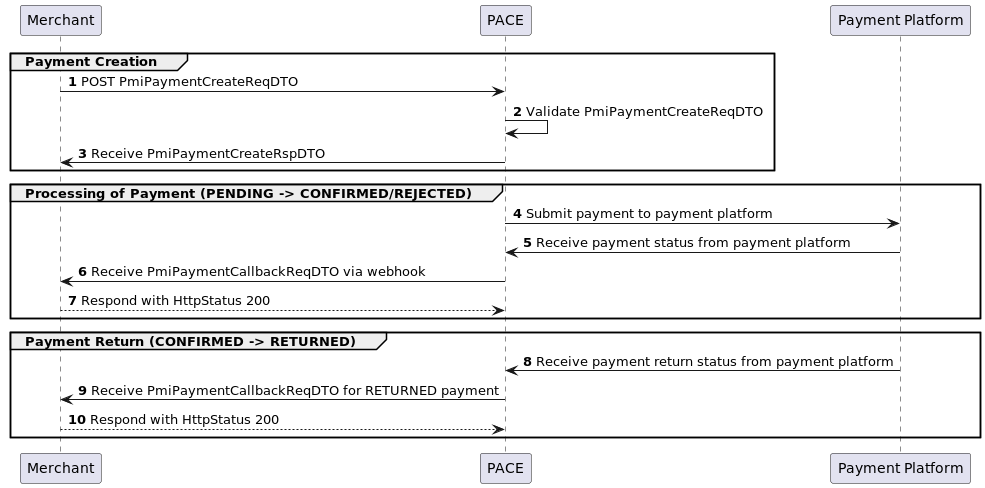
- The Merchant submits a POST request with a PmiPaymentCreateReqDTO message body and calculated digest header.
- Payen PACE will validate the PmiPaymentCreateReqDTO, ensuring compliance with format, regional, and payment-specific criteria.
- The Merchant will receive a PmiPaymentCreateRspDTO, indicating successful payment creation or details of any validation issues.
If the payment creation fails validation, the process will end at this point. If any PmiPaymentStatus other than PENDING is returned, then no payment will exist in Payen PACE and no callbacks will be sent.
- Once a payment has been successfully created it will undergo Payen PACE workflows and be dispatched to a suitable payment platform.
- Payen PACE will reconcile the status of the payment.
- Payen PACE will submit a PmiPaymentCallbackReqDTO notification to the Merchant, indicating the final status of the payment.
- The merchant should respond with a Http Status 200 (OK) to confirm receipt of the callback. Payen PACE will attempt to send the callback up to 5 times, backing off at increasing time intervals between each callback. After 5 unsuccessful attempts it will stop notifying the callback url.
It is possible for a confirmed payment to be returned in the future by the payment platform. In these cases, another notification will be sent to inform the merchant. This can be several days/weeks later.
- The payment platform notify Payen PACE that a payment has been returned.
- Payen PACE may submit another PmiPaymentCallbackReqDTO notification to the Merchant, indicating the status of the payment has moved from CONFIRMED to RETURNED.
- The merchant should respond with a Http Status 200 (OK) to confirm receipt of the callback. Payen PACE will attempt to send the callback up to five times, backing off at increasing time intervals between each callback. After five unsuccessful attempts it will stop notifying the callback url.
Message Security
The Payen PACE API enhances security through a Digest header, employing a cryptographic hash function to verify the integrity of messages during client-server interactions. The Digest header includes a hash value calculated from the message content, providing an added layer of protection against tampering. By implementing the Digest header, PACE ensures that both clients and servers can validate the integrity of transmitted data, fostering a secure and trustworthy communication process.
All requests to the Payen PACE API must contain a valid digest header named X-MERCHANT-DIGEST. All responses will contain a digest calculated in the same way, allowing the merchant to confirm that the responses are genuine and have not been tampered with.
Digest Calculation
The digest is calculated using a secret. This secret is alphanumeric and will be provided by the Payen PACE Platform to each merchant. The secret must never be transmitted in any of the request or response messages.
If the digest is calculated incorrectly, then the message cannot be identified correctly and will result in the request being rejected.
Request Digest Calculation
The following steps detail how to calculate the digest correctly and how it will be transmitted.
- Calculate a SHA-512 message digest of the JSON and Base64 encoding (not chunked, using UTF-8).
The JSON must be used in the exact form in which it will be sent, if any formatting is applied before transmission, then this is how it must be used in the digest calculation.
- Concatenate the output of the Base64 encoded digest from step 1 and the secure merchant secret.
- Perform another SHA-512 message digest and Base64 encode (not chunked, using UTF-8) from the concatenation of the previous step.
- Set the value of a HTTP header named X-MERCHANT-DIGEST to the Base64 encoded digest value from the previous step.
An example of a digest calculation is as follows – Please note that this following is a working example and can be used to verify that the merchant integration is calculating the digest correctly:
| Step | Description | Example |
|---|---|---|
| 1 | Format JSON message | {“paymentTarget”:”CANADA_EFT”,”paymentCategory”:”DISBURSEMENT”,”paymentAmount”:1.420000,”paymentCurrency”:”CAD”} |
| 2 | Get the alpha numeric merchant secret | SECRET |
| 3 | Calculate the SHA-512 digest of JSON message from step 1 and encode the resultant binary data using the base64 algorithm | cxsjMfksjRAZ8a81/097FcEr9J0XLel+2v2wmHxz/yFbE0+m6QDCDLCqTqFHJWpShrS2yP0vQ8OZkFF9TOIA1g== |
| 4 | Concatenate the secret from step 2 to Base64 encoded string from step 3 | cxsjMfksjRAZ8a81/097FcEr9J0XLel+2v2wmHxz/yFbE0+m6QDCDLCqTqFHJWpShrS2yP0vQ8OZkFF9TOIA1g==SECRET |
| 5 | Calculate the SHA-512 digest of concatenated string from the step 4 and encode the resultant binary data using the base64 algorithm | qeVKJb18vT/ibaayjP5305OtKYo7wApkxJAcypw+dID0iLwG5lP8cVUlpWOAh0EKG9Eu1ByVS+ZGyw1feJgwvw== |
import org.apache.commons.codec.binary.Base64;
import org.apache.commons.codec.digest.DigestUtils;

class DigestExample {
    public String calculateDigest(String jsonMessage, String secret) {
        StringBuilder digest = new StringBuilder();
        digest.append(Base64.encodeBase64String(DigestUtils.sha512(jsonMessage)));
        digest.append(secret);
        return Base64.encodeBase64String(DigestUtils.sha512(digest.toString()));
    }
}
Response Digest
The calculation of the response digest works in the same way as the request digest except that the merchant will need to extract the digest value created by the Payen PACE Platform. The following steps detail how the response digest will be calculated and validated.
- Calculate a SHA-512 message digest of the response JSON and Base64 encode (not chunked, using UTF-8).
- Concatenate the output of the Base64 encoded digest from step 1 and the secure merchant secret.
- Perform another SHA-512 message digest and Base64 encode (not chunked, using UTF-8) from the concatenation of previous step.
- Extract the value of the HTTP header named X-MERCHANT-DIGEST and compare the value with that from previous step.
If the response digest calculation fails, please inform the support department immediately with the transaction identifiers.
Create a Payment
| Request Type | URL | Description |
|---|---|---|
| POST | https://<baseUrl>/platform/payment/pace/api/v1/payment/create | The baseUrl can be obtained from your support contact |
To create a payment, submit a POST request to the REST endpoint https://<baseUrl>/platform/payment/pace/api/v1/payment/create adhering to the PmiPaymentCreateReqDTO structure. The header X-MERCHANT-DIGEST must be set with the digest value calculated for the PmiPaymentCreateReqDTO request body. See Digest Calculation for details on how to calculate this. The create payment method validates the submitted PmiPaymentCreateReqDTO, ensuring compliance with format, regional, and payment-specific criteria. A synchronous response in the form of PmiPaymentCreateRspDTO indicates successful payment creation or details any validation issues.
Following creation, the payment undergoes Payen PACE workflows and is dispatched to a suitable payment platform. Upon determining the final payment status, the API dispatches a PmiPaymentCallbackReqDTO to the designated merchant webhook URL, conveying the conclusive state of the payment transaction.
Header Parameters
| Key | Value |
|---|---|
| Content-Type | application/json |
| Accept | application/json |
| X-MERCHANT-DIGEST | calculated digest string |
Request Model
{
  "paymentMerchant": "PACE_TEST_MERCHANT",
  "paymentTarget": "CANADA_EFT",
  "paymentCategory": "DISBURSEMENT",
  "paymentDate": "2023-11-30",
  "paymentAmount": 1.42,
  "paymentCurrency": "CAD",
  "merchantReference": "fK3az4KmyR9gf73",
  "beneficiaryFirstName": "Firstname",
  "beneficiaryLastName": "Surname",
  "beneficiaryPostcode": "AA11AA",
  "beneficiaryDob": "2000-01-01",
  "beneficiarySortCode": "1",
  "beneficiaryBankCode": "373",
  "beneficiaryAccountNumber": "5252271",
  "callbackUrl": "https://localhost:43153/asynchronous-notification/fK3az4KmyR9gf73"
}
Return type
Webhook Callback
HTTP Status codes
| Status code | Description |
|---|---|
| 200 | Success |
| 401 | Bad Security |
| 422 | Bad parameter |
| 500 | Internal Error |
Find a Payment
| Request Type | URL | Description |
|---|---|---|
| POST | https://<baseUrl>/platform/payment/pace/api/v1/payment/find | The baseUrl can be obtained from your support contact |
To find a payment, submit a POST request to the REST endpoint https://<baseUrl>/platform/payment/pace/api/v1/payment/find, adhering to the PmiPaymentFindReqDTO structure. The header X-MERCHANT-DIGEST must be set with the digest value calculated for the PmiPaymentFindReqDTO request body. See Digest Calculation for details on how to calculate this.
Header Parameters
| Key | Value |
|---|---|
| Content-Type | application/json |
| Accept | application/json |
| X-MERCHANT-DIGEST | calculated digest string |
Request Model
{
  "paymentMerchant": "PACE_TEST_MERCHANT",
  "merchantReference": "fK3az4KmyR9gf73"
}
Return type
HTTP Status codes
| Status code | Description |
|---|---|
| 200 | Success |
| 401 | Bad Security |
| 422 | Bad parameter |
| 500 | Internal Error |
Models
PmiPaymentCreateReqDTO
Create Payment Request - A request that encapsulates all the fields required to make a variety of payments.
The exact purpose and validations associated with each field depends on the PmiPaymentTarget. Review the appropriate table for the payment target required.
INTERNATIONAL payments
The table below provides a detailed description of each field, including their format and whether they are mandatory, when used for an INTERNATIONAL payment (i.e. the paymentTarget requested is INTERNATIONAL).
| Name | Type | Description | Required |
|---|---|---|---|
| paymentMerchant | Alphanumeric - max 50 chars | Merchant Identifier | Yes |
| paymentTarget | PmiPaymentTarget | The payment target method must be 'INTERNATIONAL' | Yes |
| paymentCategory | PmiPaymentCategory | The payment category | Yes |
| paymentDate | ISO 8601 - (YYYY-MM-DD) - present or future | The payment date | Yes |
| paymentAmount | Decimal number - (e.g. 100, 100.50) | The payment amount, formatted as whole major denomination amount plus fractional minor denomination (e.g. 35.22) | Yes |
| paymentCurrency | ISO 4217 3 digit currency code | The payment currency as ISO 4217 3 digit currency code | Yes |
| paymentPurposeCode | Alphanumeric | A country specific purpose code | Mandatory for UAE, India, and MYR payments |
| merchantReference | Alphanumeric - max 70 chars | The merchant reference | Yes |
| beneficiaryReference | Alphanumeric - max 70 chars | The beneficiary reference to send with the payment | No |
| beneficiaryCompanyNumber | Alphanumeric - max 20 chars | The company number. Mandatory for company transfers, must be blank for individual (e-wallet) payments | Mandatory for company transfers, must be blank for individual (e-wallet) payments |
| beneficiaryCompanyName | Alphanumeric - max 35 chars | The company name. Mandatory for company transfers, must be blank for individual (e-wallet) payments | Mandatory for company transfers, must be blank for individual (e-wallet) payments |
| beneficiaryFirstName | Alphanumeric - max 35 chars | The beneficiary first name | Mandatory for individual payments |
| beneficiaryLastName | Alphanumeric - max 35 chars | The beneficiary last name | Mandatory for individual payments |
| beneficiaryAddr1 | Alphanumeric - max 35 chars | The beneficiary address line 1 | Yes |
| beneficiaryAddr2 | Alphanumeric - max 35 chars | The beneficiary address line 2 | No |
| beneficiaryCity | Alphanumeric - max 50 chars | The beneficiary city | Yes |
| beneficiaryStateOrProvince | Alphanumeric - max 50 chars | The beneficiary state | Mandatory if beneficiaryBankCountry is USA, Canada or Mexico |
| beneficiaryPostcode | Alphanumeric - max 12 chars | The beneficiary postcode | Yes |
| beneficiaryCountry | ISO 3166 2 digit country code | The beneficiary country (ISO 3166 2 digit country code) | Yes |
| beneficiaryDob | ISO 8601 - (YYYY-MM-DD) | The beneficiary date of birth | Mandatory for individual (e-wallet) payments |
| beneficiaryEmailAddress | Valid email address (4-255 Chars) | The beneficiary email address | No - Upcoming regulatory changes will require either the email or phone number to be provided |
| beneficiaryPhoneNumber | Allow numbers, spaces, hyphens and a plus sign (+) | The beneficiary phone number | No - Upcoming regulatory changes will require either the email or phone number to be provided |
| beneficiaryTaxId | Alphanumeric - max 12 chars | The beneficiary Tax ID | Mandatory for CLP payments |
| beneficiaryBankAccountType | Checking, Savings | The bank account type (Checking, Savings) | Mandatory for USD payments to US banks |
| beneficiarySortCode | Alphanumeric - max 6 chars | The bank sort code | Yes |
| beneficiaryBankCode | Alphanumeric - max 34 chars | The bank code | No |
| beneficiaryIban | IBAN format | The IBAN number | No, unless beneficiaryAccountNumber is not present |
| beneficiarySwiftCode | SWIFT format | The SWIFT code | Yes |
| beneficiaryAccountNumber | Alphanumeric - max 34 chars, unless beneficiaryBankCountry is 'NZ' min 9, max 10 | The bank account number | No, unless beneficiaryIban is not present |
| beneficiaryBankCountry | ISO 3166 2 digit country code | The bank country (ISO 3166 2 digit country code) | Yes |
| beneficiaryBankName | Alphanumeric - max 35 chars | The bank name | Yes |
| beneficiaryBankAddress | Alphanumeric - max 35 chars | The bank address | No |
| intermediaryAccountNumber | Alphanumeric - max 34 chars | The intermediary bank account number | No |
| intermediaryBankCode | Alphanumeric - max 34 chars | The intermediary bank code | No |
| intermediaryBankSwiftCode | SWIFT format | The intermediary bank SWIFT code | No |
| intermediaryIban | IBAN format | The intermediary bank IBAN number | No |
| intermediateBankCountry | ISO 3166 2 digit country code | The intermediate bank country (ISO 3166 2 digit country code) | No, unless intermediaryIban or intermediaryBankSwiftCode are specified |
| callbackUrl | Alphanumeric - must start http:// or https:// - max 208 chars` | URL to call when the payment changes state | No |
CANADA EFT payments
The table below provides a detailed description of each field, including their format and whether they are mandatory, when used for an CANADA EFT payment (i.e. the paymentTarget requested is CANADA_EFT).
| Name | Type | Description | Required |
|---|---|---|---|
| paymentMerchant | Alphanumeric - max 50 chars | Merchant Identifier | Yes |
| paymentTarget | PmiPaymentTarget | The payment target method, must be 'CANADA_EFT' | Yes |
| paymentCategory | PmiPaymentCategory | The payment category | Yes |
| paymentDate | ISO 8601 - (YYYY-MM-DD) | The payment date | Yes |
| paymentAmount | Decimal number - (e.g. 100, 100.50) | The payment amount, formatted as whole major denomination amount plus fractional minor denomination (e.g. 35.22) | Yes |
| paymentCurrency | ISO 4217 3 digit currency code | The payment currency as ISO 4217 3 digit currency code, must be 'CAD' | Yes |
| paymentPurposeCode | Alphanumeric - max 20 chars | A country specific purpose code (defaults to 450 if not specified) | No |
| merchantReference | Alphanumeric - max 70 chars | The merchant reference | Yes |
| beneficiaryCompanyNumber | Alphanumeric - max 25 chars | The company number. Mandatory for company transfers, must be blank for individual (e-wallet) payments | Mandatory for company transfers, must be blank for individual payments |
| beneficiaryCompanyName | Alphanumeric - max 40 chars | The company name. Mandatory for company transfers, must be blank for individual (e-wallet) payments | Mandatory for company transfers, must be blank for individual payments |
| beneficiaryFirstName | Alphanumeric - max 35 chars | The beneficiary first name | Mandatory for individual payments |
| beneficiaryLastName | Alphanumeric - max 35 chars | The beneficiary last name | Mandatory for individual payments |
| beneficiaryAddr1 | Alphanumeric - max 50 chars | The beneficiary address line 1 | Yes |
| beneficiaryAddr2 | Alphanumeric - max 50 chars | The beneficiary address line 2 | No |
| beneficiaryPostcode | Alphanumeric - max 6 chars | The beneficiary postcode | Yes |
| beneficiaryDob | ISO 8601 - (YYYY-MM-DD) | The beneficiary date Of birth | Yes |
| beneficiaryEmailAddress | Valid email address (4-255 Chars) | The beneficiary email address | No - Upcoming regulatory changes will require either the email or phone number to be provided |
| beneficiaryPhoneNumber | Allow numbers, spaces, hyphens and a plus sign (+) | The beneficiary phone number | No - Upcoming regulatory changes will require either the email or phone number to be provided |
| beneficiarySortCode | Numbers 0-9 - max 4 digits | The financial institution code | Yes |
| beneficiaryBankCode | Numbers 0-9 - max 5 digits | The financial institution branch code | Yes |
| beneficiaryAccountNumber | Numbers 0-9 - max 19 digits | The account number | Yes |
| callbackUrl | Alphanumeric - must start http:// or https:// - max 208 chars` | URL to call when the payment changes state | No |
Blank fields can be left out of the JSON string. Do not include any field definitions not mentioned in the table in the JSON string.
PmiPaymentCreateRspDTO
Create Payment Response - The table below provides a detailed description of each field returned in the response.
| Name | Type | Description |
|---|---|---|
| errors | A list of PmiErrorDTO | A list of any validation errors relating to the original PmiPaymentCreateReqDTO request |
| paceTransactionRef | Alphanumeric - max 10 chars | The PACE transaction reference for this payment |
| status | PmiPaymentStatus | The payment status indicates the current status of the payment request |
PmiPaymentCallbackReqDTO
Create Payment Callback - The table below provides a detailed description of each field returned in the callback.
| Name | Type | Description |
|---|---|---|
| paymentMerchant | Alphanumeric - max 50 chars | Merchant Identifier |
| paymentTarget | PmiPaymentTarget | The payment target describes the high level types of payment |
| paymentCategory | PmiPaymentCategory | The payment category describes it’s purpose for regulatory and fee calculations. |
| paymentDate | SO 8601 - (YYYY-MM-DD) | Payment date as user input string (ISO format yyyy-mm-dd) |
| paymentAmount | decimal number - (e.g. 100, 100.50) | Payment amount,formatted as whole major denomination amount plus fractional minor denomination (e.g. 35.22) |
| paymentCurrency | ISO 4217 3 digit currency code | Payment currency as ISO 4217 3 digit currency code (EUR) |
| paymentPurposeCode | Alphanumeric - max 255 chars | Country specific purpose code |
| merchantReference | Alphanumeric - max 60 chars (e.g. 1234_12345678) | |
| beneficiaryReference | Alphanumeric - max 70 chars | Country specific purpose code |
| beneficiaryCompanyNumber | Alphanumeric - max 35 chars | The company number. Mandatory for company transfers, must be blank for individual (e-wallet) payments |
| beneficiaryCompanyName | Alphanumeric - max 35 chars | The company name. Mandatory for company transfers, must be blank for individual (e-wallet) payments |
| beneficiaryFirstName | Alphanumeric - max 35 chars | The beneficiary first name |
| beneficiaryLastName | Alphanumeric - max 35 chars | The beneficiary last name |
| beneficiaryAddr1 | Alphanumeric - max 35 chars | The beneficiary address line 1 |
| beneficiaryAddr2 | Alphanumeric - max 35 chars | The beneficiary address line 2 |
| beneficiaryCity | Alphanumeric - max 50 chars | The beneficiary city |
| beneficiaryStateOrProvince | Alphanumeric - max 50 chars | The beneficiary state |
| beneficiaryPostcode | Alphanumeric - max 12 chars | The beneficiary postcode |
| beneficiaryCountry | ISO 3166 2 digit country code | The beneficiary country (ISO 3166 2 digit country code) |
| beneficiaryDob | ISO 8601 - (YYYY-MM-DD) | Beneficiary DOB |
| beneficiaryEmailAddress | Valid email address (4-255 Chars) | The beneficiary email address |
| beneficiaryPhoneNumber | Allow numbers, spaces, hyphens and a plus sign (+) | The beneficiary phone number |
| beneficiaryTaxId | Alphanumeric - max 12 chars | Beneficiary Tax ID |
| beneficiaryBankAccountType | Checking, Savings | The bank account type |
| beneficiarySortCode | Alphanumeric - max 6 chars | The bank sort code |
| beneficiaryBankCode | Alphanumeric - max 34 chars | The bank code |
| beneficiaryIban | IBAN format | The IBAN number |
| beneficiarySwiftCode | SWIFT format | The SWIFT code |
| beneficiaryAccountNumber | Alphanumeric - max 34 chars | The bank account number |
| beneficiaryBankCountry | ISO 3166 2 digit country code | The bank country (ISO 3166 2 digit country code) |
| beneficiaryBankName | Alphanumeric - max 35 chars | The bank name |
| beneficiaryBankAddress | Alphanumeric - max 35 chars | The bank address |
| intermediaryAccountNumber | Alphanumeric - max 34 chars | The intermediary bank account number |
| intermediaryBankCode | Alphanumeric - max 34 chars | The intermediary bank code |
| intermediaryBankSwiftCode | SWIFT format | The intermediary bank SWIFT code |
| intermediaryIban | IBAN format | The intermediary bank IBAN number |
| intermediateBankCountry | ISO 3166 2 digit country code | The intermediate bank country (ISO 3166 2 digit country code) |
| paceTransactionRef | Alphanumeric - max 10 chars | The PACE transaction reference for this payment |
| status | PmiPaymentStatus | The payment status indicates the current status of the payment request |
PmiPaymentFindReqDTO
Find Payment Request - A request that encapsulates all the fields required to find a payments. The PmiPaymentFindReqDTO can specify either the pace transaction reference or the merchant transaction reference. If both are specified then the pace transaction reference takes precedence. If neither are specified then a 422 error is returned. The table below provides a detailed description of each field, including their format and whether they are mandatory.
| Name | Type | Description | Required |
|---|---|---|---|
| paymentMerchant | Alphanumeric - max 50 chars | Merchant Identifier | Yes |
| paceReference | Alphanumeric - max 10 chars | Pace Transaction Ref | No, unless merchantReference is not provided |
| merchantReference | Alphanumeric - max 60 chars (e.g. 1234_12345678) | Merchant Transaction Ref | No, unless paceReference is not provided |
PmiPaymentFindRspDTO
Find Payment Response - The table below provides a detailed description of each field returned in the response.
| Name | Type | Description |
|---|---|---|
| paymentMerchant | Alphanumeric - max 50 chars | Merchant Identifier |
| paymentTarget | PmiPaymentTarget | The payment target describes the high level types of payment |
| paymentCategory | PmiPaymentCategory | The payment category describes it’s purpose for regulatory and fee calculations. |
| paymentDate | ISO 8601 - (YYYY-MM-DD) | Payment date as user input string (ISO format yyyy-mm-dd) |
| paymentAmount | decimal number - (e.g. 100, 100.50) | Payment amount, formatted as whole major denomination amount plus fractional minor denomination (e.g. 35.22) |
| paymentCurrency | ISO 4217 3 digit currency code | Payment currency as ISO 4217 3 digit currency code (EUR) |
| paymentPurposeCode | Alphanumeric - max 255 chars | Country specific purpose code |
| merchantReference | Alphanumeric - max 60 chars (e.g. 1234_12345678) | The merchant reference |
| beneficiaryReference | Alphanumeric - max 70 chars | The beneficiary reference to send with the payment |
| beneficiaryCompanyNumber | Alphanumeric - max 35 chars | The company number. Mandatory for company transfers, must be blank for individual (e-wallet) payments |
| beneficiaryCompanyName | Alphanumeric - max 35 chars | The company name. Mandatory for company transfers, must be blank for individual (e-wallet) payments |
| beneficiaryFirstName | Alphanumeric - max 35 chars | The beneficiary first name |
| beneficiaryLastName | Alphanumeric - max 35 chars | The beneficiary last name |
| beneficiaryAddr1 | Alphanumeric - max 35 chars | The beneficiary address line 1 |
| beneficiaryAddr2 | Alphanumeric - max 35 chars | The beneficiary address line 2 |
| beneficiaryCity | Alphanumeric - max 50 chars | The beneficiary city |
| beneficiaryStateOrProvince | Alphanumeric - max 50 chars | The beneficiary state |
| beneficiaryPostcode | Alphanumeric - max 12 chars | The beneficiary postcode |
| beneficiaryCountry | ISO 3166 2 digit country code | The beneficiary country (ISO 3166 2 digit country code) |
| beneficiaryDob | ISO 8601 - (YYYY-MM-DD) | Beneficiary DOB |
| beneficiaryEmailAddress | Valid email address (4-255 Chars) | The beneficiary email address |
| beneficiaryPhoneNumber | Allow numbers, spaces, hyphens and a plus sign (+) | The beneficiary phone number |
| beneficiaryTaxId | Alphanumeric - max 12 chars | Beneficiary Tax ID |
| beneficiaryBankAccountType | Checking, Savings | The bank account type (Checking/Savings - Mandatory for USD payments to US banks) |
| beneficiarySortCode | Alphanumeric - max 6 chars | The bank sort code |
| beneficiaryBankCode | Alphanumeric - max 34 chars | The bank code |
| beneficiaryIban | IBAN format | The IBAN number |
| beneficiarySwiftCode | SWIFT format | The SWIFT code |
| beneficiaryAccountNumber | Alphanumeric - max 34 chars | The bank account number |
| beneficiaryBankCountry | ISO 3166 2 digit country code | The bank country (ISO 3166 2 digit country code) |
| beneficiaryBankName | Alphanumeric - max 35 chars | The bank name |
| beneficiaryBankAddress | Alphanumeric - max 35 chars | The bank address |
| intermediaryAccountNumber | Alphanumeric - max 34 chars | The intermediary bank account number |
| intermediaryBankCode | Alphanumeric - max 34 chars | The intermediary bank code |
| intermediaryBankSwiftCode | SWIFT format | The intermediary bank SWIFT code |
| intermediaryIban | IBAN format | The intermediary bank IBAN number |
| intermediateBankCountry | ISO 3166 2 digit country code | The intermediate bank country (ISO 3166 2 digit country code) |
| paceTransactionRef | Alphanumeric - max 10 chars | The PACE transaction reference for this payment |
| status | PmiPaymentStatus | The payment status indicates the current status of the payment request |
PmiPaymentTarget
Payment Target - The payment target describes the high level types of payment, impacting validation and routing to payment platforms.
| Value | Description |
|---|---|
| INTERNATIONAL | Any payment that will be settled over SWIFT or SEPA |
| CANADA_EFT | A Canadian EFT payment |
PmiPaymentCategory
Payment Category - The payment category describes its purpose for regulatory and fee calculations.
| Value | Description |
|---|---|
| DISBURSEMENT | A general payment to an individual, typically a business to customer payment (B2C) |
| AFFILIATE | A business to business payment (B2B) |
| MARKETING | A marketing payment |
| DIVIDEND | A dividend payment |
| FUNDING | A payment to fund your account for subsequent outbound payments |
PmiPaymentStatus
Payment Status - The payment status indicates the current status of the payment request
| Value | Description |
|---|---|
| PENDING | The payment has been created and is pending a response of final status from the payment platform |
| REJECTED | The payment has been rejected by the payment platform |
| CONFIRMED | The payment has been successfully paid and confirmed by the payment platform |
| RETURNED | The payment has been returned by the payment platform |
PmiErrorDTO
Error Detail - An message payload describing specific errors
| Name | Type | Description |
|---|---|---|
| errorCode | String | A validation error code listed below Error Codes |
| errorDescription | String | A description of the error |
Error Codes
If a request to the Payen PACE API fails validation checks, the response will contain one or more error codes in the errors part of the response. The codes take the form P{A|B|C}nnn
where
- A = Missing value
- B = Invalid value
- C = Invalid format
- nnn = Indicates the field that has failed validation.
For example, an error code of PA009 indicates the beneficiaryFirstName is missing
| Validation Code | field | Missing Value Code | Invalid Value Code | Invalid Format Code |
|---|---|---|---|---|
| 001 | paymentDate | PA001 | PB001 | PC001 |
| 002 | paymentAmount | PA002 | PB002 | PC002 |
| 003 | paymentCurrency | PA003 | PB003 | PC003 |
| 004 | paymentPurposeCode | PA004 | PB004 | PC004 |
| 005 | merchantReference | PA005 | PB005 | PC005 |
| 006 | beneficiaryReference | PA006 | PB006 | PC006 |
| 007 | beneficiaryCompanyNumber | PA007 | PB007 | PC007 |
| 008 | beneficiaryCompanyName | PA008 | PB008 | PC008 |
| 009 | beneficiaryFirstName | PA009 | PB009 | PC009 |
| 010 | beneficiaryLastName | PA010 | PB010 | PC010 |
| 011 | beneficiaryAddr1 | PA011 | PB011 | PC011 |
| 012 | beneficiaryAddr2 | PA012 | PB012 | PC012 |
| 013 | beneficiaryCity | PA013 | PB013 | PC013 |
| 014 | beneficiaryStateOrProvince | PA014 | PB014 | PC014 |
| 015 | beneficiaryPostcode | PA015 | PB015 | PC015 |
| 016 | beneficiaryDob | PA016 | PB016 | PC016 |
| 017 | beneficiaryTaxId | PA017 | PB017 | PC017 |
| 018 | beneficiaryCountry | PA018 | PB018 | PC018 |
| 019 | beneficiaryBankAccountType | PA019 | PB019 | PC019 |
| 020 | beneficiaryIban | PA020 | PB020 | PC020 |
| 021 | beneficiarySwiftCode | PA021 | PB021 | PC021 |
| 022 | beneficiaryBankCode | PA022 | PB022 | PC022 |
| 023 | beneficiarySortCode | PA023 | PB023 | PC023 |
| 024 | beneficiaryAccountNumber | PA024 | PB024 | PC024 |
| 025 | beneficiaryBankCountry | PA025 | PB025 | PC025 |
| 026 | beneficiaryBankName | PA026 | PB026 | PC026 |
| 027 | beneficiaryBankAddress | PA027 | PB027 | PC027 |
| 038 | callbackUrl | PA038 | PB038 | PC038 |
| 039 | beneficiaryEmailAddress | PA039 | PB039 | PC039 |
| 040 | beneficiaryPhoneNumber | PA040 | PB040 | PC040 |
| 041 | intermediaryIban | PA041 | PB041 | PC041 |
| 042 | intermediaryBankSwiftCode | PA042 | PB042 | PC042 |
| 043 | intermediaryAccountNumber | PA043 | PB043 | PC043 |
| 044 | intermediaryBankCode | PA044 | PB044 | PC044 |
| 045 | intermediateBankCountry | PA045 | PB045 | PC045 |
Testing Trigger Values
The sandbox environment uses trigger values to simulate specific scenarios during testing. These scenarios enable testers to receive a callback with an expected status.
The following table describes the fields on the create payment request and the trigger values to simulate the payment moving to specific states.
Where more than one trigger field is listed for a scenario, all listed fields must be set to the given values to ensure the trigger is activated.
For example, scenario 2 lists the fields paymentCurrency and paymentAmount. These must be set to XXX and 9.99 respectively to activate the trigger.
| Scenario | Description | Fields | Values |
|---|---|---|---|
| 1 | Set the payment status to CONFIRMED. | beneficiaryFirstName | CONFIRMED |
| 2 | Set the payment status to CONFIRMED. | paymentAmount paymentCurrency | 9.99 XXX |
| 3 | Set the payment status to REJECTED. | beneficiaryFirstName | REJECTED |
| 4 | Set the payment status to REJECTED. | paymentAmount paymentCurrency | 9.98 XXX |
| 5 | Set the payment status to RETURNED. | beneficiaryFirstName | RETURNED |
| 6 | Set the payment status to RETURNED. | paymentAmount paymentCurrency | 9.97 XXX |